The short answer
- Decide where you’ll sell it. Each market has its own panel.
- Get trustworthy numbers from a lab, your supplier or your recipe.
- Set the serving size and pack size.
- Apply the market’s rounding and daily values, once, at the end.
- Pick a format that fits the pack at the minimum type sizes.
- Add ingredients and allergens, check, and print at 100%.
That’s the whole job. The rest of this guide takes each step in turn and ends with a full worked example: a granola label for the United States, with every number shown before and after rounding.
Step 1: Decide where you'll sell it
Start with the destination, because it decides almost everything else. The US Nutrition Facts panel is per serving with % Daily Values. Canada uses a bilingual Nutrition Facts table with its own daily values and, for many foods, a front-of-package “High in” symbol. The UK and the EU use a nutrition declaration per 100 g or 100 ml, with salt instead of sodium and energy in kJ and kcal. Australia and New Zealand use a Nutrition Information Panel with two columns, per serving and per 100 g.
So the same product needs a different panel in each market, built from the same values. Here is one granola, drawn for four markets by the maker:
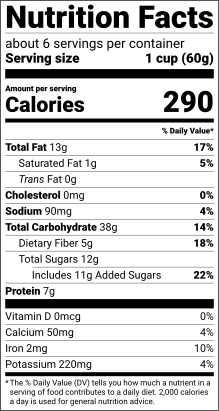
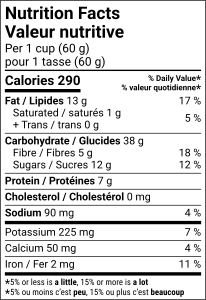
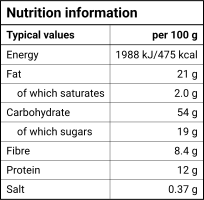
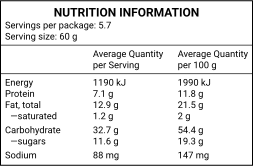
The same Honey Almond Granola sample, made once and drawn for the United States, Canada, Great Britain and Australia. Drawn to the same scale.
If you sell in more than one market, make each label from one product record rather than copying numbers between them. See how each market's label differs for a side-by-side comparison.
Step 2: Get trustworthy numbers
The label can only be as good as the numbers behind it. There are three usual sources:
- Lab analysis. A food lab measures your finished product. It’s the reference when processing changes nutrients a lot, and it’s the safer basis when you make nutrition claims.
- Supplier specifications. For a product you buy in and repack, or a single ingredient, the supplier’s spec sheet often has the values per 100 g.
- Recipe calculation. Weigh every ingredient, look up its values in reliable data (such as USDA FoodData Central), add them up and divide by the finished weight. Our guide shows how to calculate from a recipe.
Note the basis of each value. “Per 100 g” means the amount in 100 grams of the food; “per serving” means the amount in one serving of the size you declare. Converting between them needs the serving weight (and, for drinks sold by volume, the density). Keep the unrounded values: rounding happens later, once.
Empty is not zero
Step 3: Set the serving and pack size
- United States and Canada: the serving size is not your choice alone. It’s based on a reference amount set for each kind of food (the US “RACC”, Canada’s reference amounts) and stated in a household measure plus grams. For granola, the US reference amount is 60 g; Canada’s table gives 55 g and asks for the serving in cups. The sample’s serving, “1 cup (60 g)”, works for both.
- United Kingdom and EU: values are per 100 g or per 100 ml. A per-portion column is optional, but if you add it you must say how many portions are in the pack.
- Australia and New Zealand: you choose the serving size, and the panel shows both per serving and per 100 g, with the number of servings per package (for the granola: “Servings per package: 5.7”).
You also need the net quantity of the pack: it sets the servings per container (the US label rounds the granola’s 340 g ÷ 60 g = 5.67 to “about 6 servings per container”) and, in the US, whether a second column for the whole package is required.
Step 4: Round and calculate % Daily Value
Each market rounds differently, and the rounding is applied once, to the unrounded value on the label’s basis. Then the % Daily Value (US and Canada) or % Reference Intake (UK and EU, optional) is worked out. Here is the granola’s sodium, one row per market, as the maker prints it:
| Market | What is declared | Unrounded | Rule | On the label |
|---|---|---|---|---|
| United States | Sodium per serving (60 g) | 88.08 mg | Nearest 5 mg; %DV of 2,300 mg | 90mg, 4% DV |
| Canada | Sodium per serving (60 g) | 88.08 mg | Nearest 5 mg; %DV of 2,300 mg | 90 mg, 4 % |
| United Kingdom and EU | Salt per 100 g (sodium × 2.5) | 0.367 g | Nearest 0.01 g | 0.37 g |
| Australia and New Zealand | Sodium per serving (60 g) | 88.08 mg | Nearest 1 mg | 88 mg |
The UK and EU print salt (sodium × 2.5), and Australia and New Zealand keep three significant figures, so the same 88 mg becomes four different lines. The full tables for every nutrient are in our guide to rounding rules.
Step 5: Pick a format that fits
The space on your pack decides the format, not taste. In the US, the standard vertical panel needs about 3 inches of height; without it you may use the tabular (horizontal) layout. Packages with 40 square inches or less of labeling space may use small-package tabular or linear formats, and below 12 square inches a pack that makes no claims may print a phone number or address for nutrition information instead. Whatever the format, type never goes below the minimums: in the US, 8 pt for nutrient lines and 6 pt for the smallest text; in the UK and EU, an x-height of 1.2 mm (0.9 mm when the largest surface is under 80 cm²).
Shrinking a panel until it fits is the most common way a label goes wrong. Pick a format that fits at the minimum sizes instead. The guide to type sizes lists every minimum and the real size of each format, and our blank templates show each layout at its true size.
Step 6: Ingredients, allergens and printing
- Ingredient list: in descending order of weight, with compound ingredients followed by their own ingredients in brackets.
- Allergens: the US names the nine major food allergens in a “Contains” statement (or in brackets in the list); Canada adds a bilingual “Contains / Contient”; the UK and EU emphasize the 14 allergens in the list itself, usually in bold; Australia and New Zealand bold the allergen names and add a bold “Contains” summary. See the 14 allergens and the ingredient label maker.
- Printing: print a proof at 100% scale (never “fit to page”) and measure it with a ruler. The maker’s downloads include a 100% test sheet with rulers to check your printer first.
Worked example: honey almond granola
Our sample granola has its values per 100 g, the way a lab report or supplier spec usually gives them (here they were calculated from the recipe with USDA data). The serving is 1 cup (60 g), so each value is multiplied by 0.6 and then rounded with the FDA rules. Calories, for example: 478.2 per 100 g × 0.6 = 286.9. The band “More than 50 Calories: nearest 10 Calories” applies, so the label prints 290. Sodium: 88.08 mg rounds to 90mg, and 90 ÷ 2,300 mg gives 4% of the Daily Value.
| Nutrient | Per 100 g | Per serving (60 g), unrounded | Rounding | Label | %DV |
|---|---|---|---|---|---|
| Calories | 478.2 kcal | 286.9 kcal | More than 50 Calories: nearest 10 Calories | 290 | — |
| Total Fat | 21.46 g | 12.88 g | 5 g or more: nearest 1 g | 13g | 17% |
| Saturated Fat | 1.984 g | 1.19 g | 0.5 g to less than 5 g: nearest 0.5 g | 1g | 5% |
| Trans Fat | 0.03615 g | 0.02169 g | Less than 0.5 g: print 0 g | 0g | — |
| Cholesterol | 0 mg | 0 mg | Less than 2 mg: print 0 mg | 0mg | 0% |
| Sodium | 146.8 mg | 88.08 mg | 5 to 140 mg: nearest 5 mg | 90mg | 4% |
| Total Carbohydrate | 62.82 g | 37.69 g | 1 g or more: nearest 1 g | 38g | 14% |
| Dietary Fiber | 8.403 g | 5.042 g | 1 g or more: nearest 1 g | 5g | 18% |
| Total Sugars | 19.26 g | 11.56 g | 1 g or more: nearest 1 g | 12g | — |
| Added Sugars | 17.87 g | 10.72 g | 1 g or more: nearest 1 g | 11g | 22% |
| Protein | 11.84 g | 7.104 g | 1 g or more: nearest 1 g | 7g | — |
| Vitamin D | 0 mcg | 0 mcg | Any amount: nearest 0.1 mcg | 0mcg | 0% |
| Calcium | 86.29 mg | 51.77 mg | Any amount: nearest 10 mg | 50mg | 4% |
| Iron | 3.348 mg | 2.009 mg | Any amount: nearest 0.1 mg | 2mg | 10% |
| Potassium | 368.5 mg | 221.1 mg | Any amount: nearest 10 mg | 220mg | 4% |
Protein shows no %DV: on a US label it’s voluntary unless you make a protein claim, and it needs a protein-quality (PDCAAS) value, which this maker doesn’t take yet, so it’s left off. And the servings line reads “about 6 servings per container”. Here is the finished panel:
To make the same label for your product, open the maker with the US label selected and type in your values; you can add Canada, the UK, the EU, Australia or New Zealand to the same product later. If you sell only in the US, the US Nutrition Facts generator page explains the FDA panel in detail.
Checklist before you print
- You kept the source of every value (lab report, supplier spec or recipe with its weights).
- The serving size follows the market’s rule and matches the household measure on the panel.
- Values were rounded once, from unrounded numbers, with the market’s rules.
- Every mandatory row is there, and no missing value was filled in as 0.
- Allergens were checked by you for every ingredient, including sub-ingredients.
- The format fits the space at the minimum type sizes, without shrinking.
- The label is in the market’s language(s): English and French for Canada; the member state’s language for the EU.
- Net quantity, the food’s name and your business name and address appear elsewhere on the pack as the market requires.
- You printed a proof at 100% and measured it.
- For claims, special diets or unusual processing, a food-labeling specialist has looked at it.