The short answer
The FDA doesn’t name a font. It asks for one easy-to-read type style, in upper and lower case, with minimum sizes: 8 pt for most text, 6 pt for the smallest, and “Nutrition Facts” larger than everything except the Calories number. FDA’s own example labels use Helvetica. Outside the US, the rule is an x-height (UK, EU, Canada’s ingredient list) or simply legibility (Australia, New Zealand).
Which font should you use?
The regulation (21 CFR 101.9(d)(1)(ii)) asks for a single easy-to-read type style, upper and lower case letters, and letters that never touch each other or the rules. The FDA’s recommended graphics in Appendix B to Part 101 set the label in Helvetica Black and Helvetica Regular, with “Nutrition Facts” in Helvetica Black or Franklin Gothic Heavy. That’s a recommendation, not a requirement.
- Helvetica, Arial and similar grotesques are the usual choice: compact, with clear numbers. Helvetica is a commercial font, so check that your license covers packaging.
- One family, two weights. A heavy weight for the title, the Calories line and the main nutrient names, a regular weight for everything else. The only italic the FDA uses is the word “Trans”.
- No decorative fonts inside the panel, whatever the rest of the pack uses, and no reverse (white-on-dark) type as highlighting.
The maker sets every label in Roboto, an open-license (SIL OFL) grotesque with regular, bold, black and condensed widths, and embeds it in the PDF so the printer gets exactly what you saw. Canada’s format directory draws its tables in Helvetica and Helvetica Condensed, and accepts similar sans-serif substitutes.
Minimum type sizes on a US label
These are the smallest sizes each element may be set at, in points (1 pt = 1/72 inch). You may make everything larger, keeping the proportions, but never smaller. Small packages are those with 40 square inches or less of labeling space using the small-package tabular or linear format.
| Element | Standard vertical | Small packages |
|---|---|---|
| “Nutrition Facts” | Larger than all other type except the Calories number | Larger than all other type except the Calories number |
| Servings per container | 10 pt | 9 pt |
| Serving size | 10 pt (8 pt if 10 pt does not fit) | 9 pt (8 pt if it does not fit) |
| “Calories” | 16 pt | 10 pt |
| Calories number | 22 pt | 14 pt |
| Nutrient names and amounts | 8 pt | 8 pt |
| “Amount per serving”, “% Daily Value*”, footnote | 6 pt | 6 pt |
| Everything, on packages under 12 sq in (linear) | — | 6 pt |
The lines matter too. In the maker’s standard layout, nutrient rows sit on a 12.002 pt pitch with a 0.25 pt hairline between them, a 7 pt bar under the serving size and above the vitamins, a 3 pt bar under Calories, and a 0.5 pt box around the panel, following FDA’s recommended graphics and sample labels. The ingredient list and the “Contains” statement elsewhere on the pack have their own minimum: 1/16 inch measured on the lower-case “o”, which is 8.22 pt in the maker’s font (it uses 8.5 pt).
How big is a Nutrition Facts label?
The standard vertical panel is 58.0 mm (2.28 in) wide at FDA’s proportions; its height depends on how many rows your product needs. These are the sizes the maker draws for our granola sample (the simplified format uses the hot sauce sample, which qualifies for it):
| Format | Size (width × height) | When it’s used |
|---|---|---|
| Standard vertical | 58.0 × 108.8 mm 2.28 × 4.28 in | The default, when the pack has about 3 in (76 mm) of height for the panel. |
| Vertical, vitamins side by side | 58.0 × 100.3 mm 2.28 × 3.95 in | The same, with vitamins and minerals two per line to save height. |
| Dual column | 75.4 × 113.3 mm 2.97 × 4.46 in | Required when a package holds 200–300% of the reference amount; optional above that. |
| Tabular (horizontal) | 166.7 × 42.4 mm 6.56 × 1.67 in | When the pack doesn’t have about 3 in of height for the panel. |
| Simplified | 58.0 × 74.8 mm 2.28 × 2.95 in | When at least 8 of the 15 core nutrients are present in insignificant amounts. |
| Small package, tabular | 103.4 × 37.1 mm 4.07 × 1.46 in | Packages with 40 sq in or less of labeling space, when the larger formats don’t fit. |
| Linear (small package) | 116.8 × 21.3 mm 4.60 × 0.84 in | Packages with 40 sq in or less, when no tabular format fits. |
| Linear, 6 pt (under 12 sq in) | 116.8 × 12.3 mm 4.60 × 0.48 in | Packages under 12 sq in: all type may be 6 pt. |
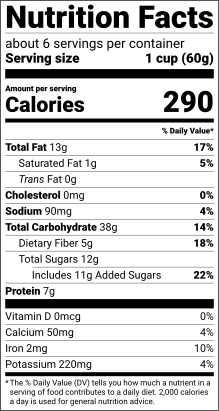
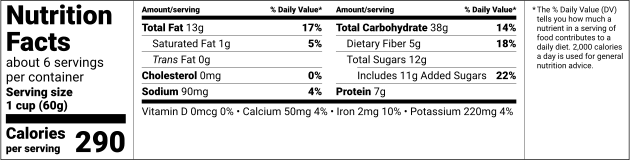

Three of the granola’s US formats, drawn by the maker to the same scale: standard vertical, tabular and linear.
The maker never shrinks a label below these sizes to make it fit. Tell it the space on your pack and it offers only the formats that fit at their minimum sizes, with their dimensions. Below 12 square inches, a pack that makes no claims may print a phone number or address for nutrition information instead of a panel. Our blank templates at the right size show every layout at its true size, and the US Nutrition Facts generator picks the format for you.
Canada
Canada prescribes the layout itself. The Directory of Nutrition Facts Table Formats, which the Food and Drug Regulations incorporate, draws every version with its type sizes, leading and rules, and you choose the first version that fits on 15% of the package’s available display surface. The table uses one sans-serif font, in black (or a colour that reads as black) on a white or neutral background. The minimum size of the nutrient lines is part of each version’s name. The versions the maker draws are:
- Bilingual standard 3.1 (8 pt)
- Bilingual standard 3.2 (7 pt)
- Bilingual standard 3.3 (7 pt condensed)
- Bilingual standard 3.4 (6 pt condensed)
- Bilingual horizontal 4.1 (7 pt condensed)
- Bilingual horizontal 4.2 (6 pt condensed)
- Bilingual standard 3.5 (6 pt condensed, small)
- Bilingual standard 3.6 (6 pt condensed, tighter)
- Bilingual standard 3.7 (6 pt condensed, tightest)
- Bilingual horizontal 4.3 (6 pt condensed, small)
- Bilingual horizontal 4.4 (6 pt condensed, tighter)
- Linear 16.1 (7 pt, English then French)
- Linear 16.2 (6 pt, English then French)
The bilingual versions carry every line in English and French, so they need more room than a one-language table would. The ingredient list and “Contains” statement have their own rule: an x-height of at least 1.1 mm (5.91 pt in the maker’s font), more when the table’s nutrients are set at 8 pt or larger.
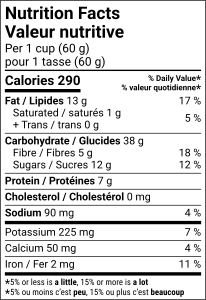
The granola’s bilingual Canadian table, version 3.1, at its 8 pt nutrient size.
EU and UK: x-height
The EU and UK don’t give point sizes. Regulation (EU) No 1169/2011 sets a minimum x-height for all mandatory information, including the nutrition declaration: 1.2 mm, or 0.9 mm when the package’s largest surface is smaller than 80 cm². The x-height is the height of a lower-case “x”, so the point size you need depends on the font.
In the maker’s font the x-height is 52.8% of the type size, so 1.2 mm needs at least 6.44 pt and 0.9 mm needs 4.83 pt. A font with a smaller x-height needs a larger point size for the same result. A voluntary front-of-pack repeat, such as the UK traffic lights, needs 1.2 mm even on small packs. See the EU label page for the rest of the layout.
Australia and New Zealand
The Food Standards Code prescribes the Nutrition Information Panel’s structure but no point size and no typeface: the information must be legible, prominent and in clear contrast to the background (Standard 1.2.1). Two related rules do set sizes: warning statements need type at least 3 mm high (1.5 mm on small packages), and the allergen summary statement must use the same typeface and size as the allergen names in the ingredient list. The maker keeps NIP text at 6 pt or more as its own legibility floor.
Check it at actual size
- Print the label at 100% scale, never “fit to page”. The maker’s downloads include a 100% test sheet with rulers to check your printer.
- Measure the printed panel with a ruler: it should match the size the maker shows to the millimetre.
- Proof it on the real material, at the real size, and read every line at arm’s length.
- If your designer places the label in packaging artwork, place the PDF at 100% and don’t let the layout program scale it.
The other five steps of a label are in how to make a nutrition label. Or open the maker and let it pick a format that fits.